How to choose a family calendar for busy parents
The right family calendar is one everyone can use, with school information you can trust and reminders that reach the person doing the pickup. Start with those jobs before paying for extra features.
Which kind of calendar does your family need?
- Dates are already organised, but adults need the same view: try sharing the calendar you already use.
- You want a shared calendar alongside family lists: compare a family organiser's free and paid plans.
- The work is extracting dates from emails, letters and invitations: check how each app brings that information in, what it costs and whether you can review it.
A calendar can be a good choice without being the most expensive one. Try a normal school week before moving everything.
One school week: test the jobs your calendar needs to handle
Here is a fictional week for Ella, Max and Leo at fictional Oakfield Primary, 2–8 November 2026. The adults are examples, not real family members. Use it to test any app on your shortlist.
Swipe the table sideways to see deadlines and adult access.
| What arrives | What belongs in the calendar | The separate job | Who needs access |
|---|---|---|---|
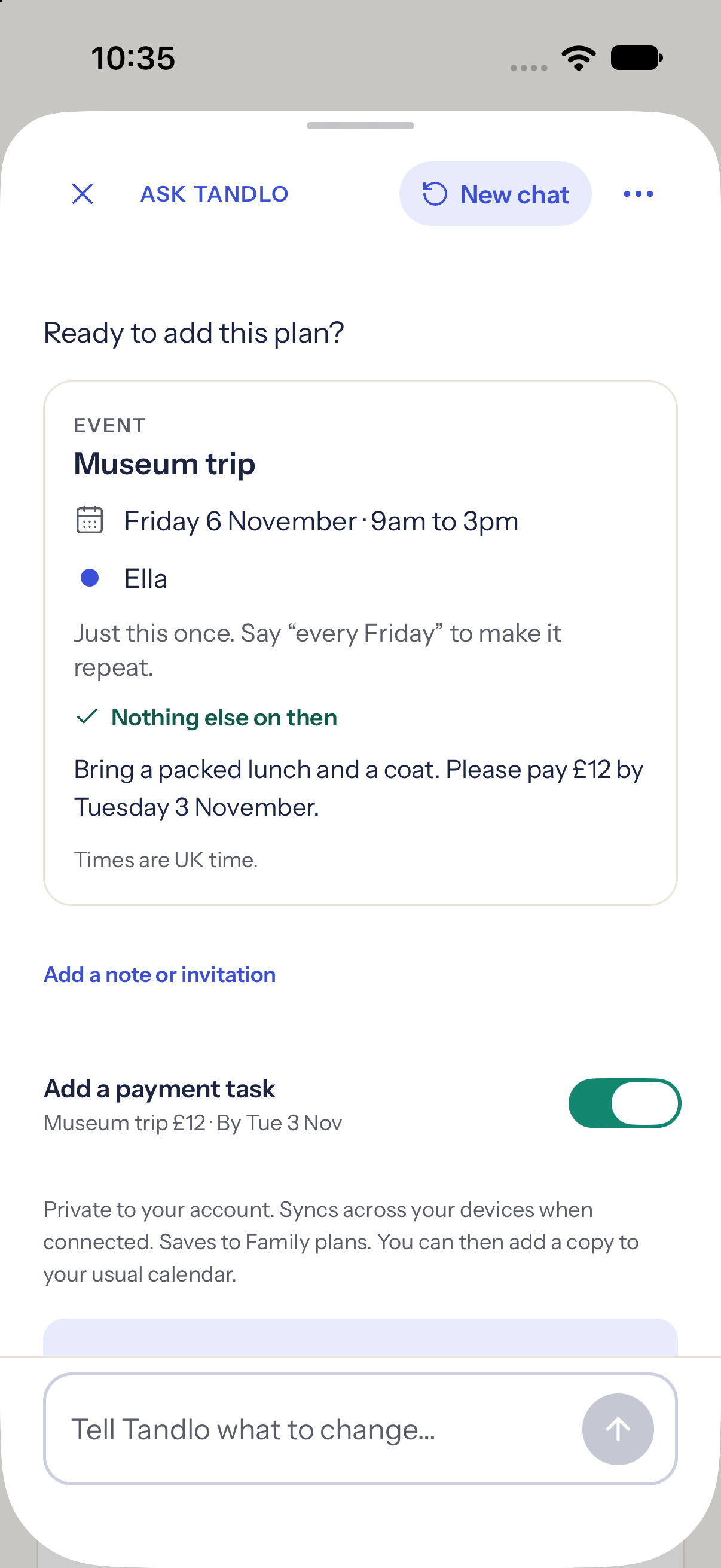
| Ella's museum trip letter | Friday 6 November, 9am–3pm. | Pay £12 by Tuesday 3 November. Pack a lunch and coat before leaving. | The organising adult checks the letter; the other adult needs the departure and packing details. |
| Max's changed club pickup | Thursday 5 November, now 4:15pm instead of 4:45pm. | Correct the old time and tell the collecting adult. Check their reminder separately. | The collecting adult must see the changed time; a saved event alone does not confirm they have read it. |
| An invitation for Leo | Saturday 14 November, 2–4pm. | Reply by Thursday 5 November, before the party. A saved plan is not an RSVP. | The adult replying needs the invitation; the collecting adult needs the party time. Guests can reply to a Tandlo invitation in a browser. |
Try each input, correct a mistake and ask the second adult to find the updated plan without help. Check a read-only option for a grandparent or carer if that is the access you need.
1. Decide who needs to see and change plans
Write down who actually helps: a partner, co-parent, grandparent or childminder. Decide who needs the whole week, who needs just one child's activities, and who should be able to change a plan. A shared login and a calendar shared with separate accounts give you different control.
Check whether the second adult can edit, whether you can remove access later, and whether personal appointments can stay separate. In two households, test the exact visibility you need rather than assuming that a family account provides it.
Google Calendar documents different viewing and editing permissions. If everyone uses iCloud, Apple lets you share an iCloud calendar and control editing. A public calendar link is a different kind of sharing; use private invitations for your family schedule.
2. Match it to how your school sends information
Look at the last few things your school sent. Are dates in a subscription calendar, a newsletter, a PDF, an app notice or a photograph of a letter? These need different routes into a calendar.
- Calendar subscription: check that the school publishes a usable link, which children or clubs it covers, and how changes reach your calendar. A file imported once is different from a subscription.
- Email or PDF: try an example containing both a trip date and a payment deadline. Does it keep the two separate? Can you correct the result before saving?
- Portal notice or invitation image: check whether you can bring in the text or screenshot. A link to a signed-in school portal alone may not contain the details an app needs.
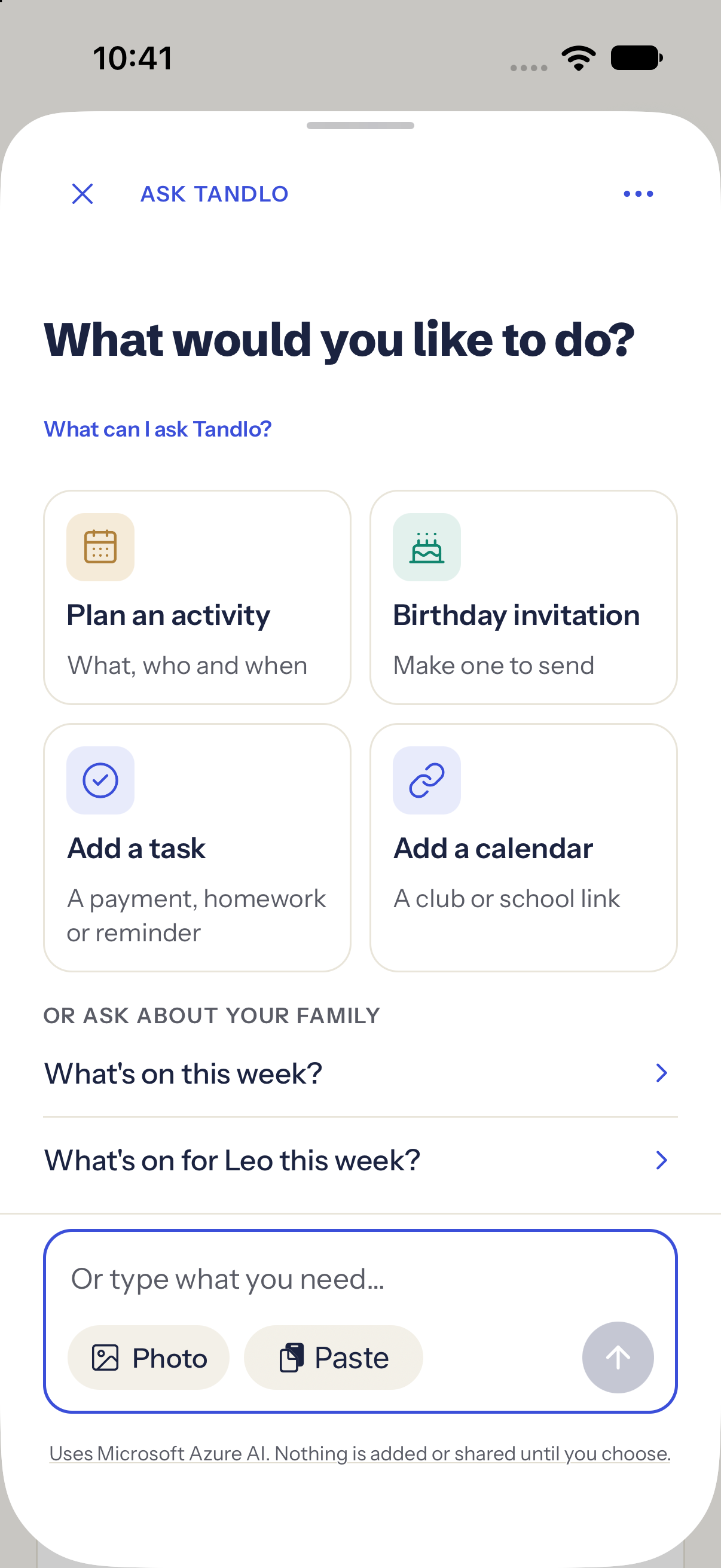
Our school calendar guide explains subscription options. For emails, see the illustrated Gmail and Outlook/Hotmail guides. In Tandlo, you can also bring text, a photo or a calendar link into Ask Tandlo and check the suggested details.
Saving a date does not pay for a trip, give consent or RSVP to a party. Keep those actions visible as separate tasks, whichever app you choose.
3. Test reminders on the other adult's phone
Seeing a shared event and receiving a reminder are separate checks. Try a reminder the evening before for packing a kit bag, and another early enough to leave for pickup. Check who receives each one and whether that timing is available on the plan you are considering.
For example, Google says event reminders are not shared with Google Calendar guests; guests use their own settings. Do not assume a reminder that works on your phone will also alert your partner.
Test a changed time and a cancellation too. Check notification permission and Focus or Do Not Disturb settings on each phone. Keep your usual reminder in place until the new arrangement has worked for both adults.
4. Compare the price for your whole family
Check the cost of the features you will use, including the second adult. A free download does not tell you whether sharing, extra reminders, email reading or invitation designs are included.
- Is the subscription per person or per household?
- Is the price monthly, annual, or an introductory offer?
- Are AI reads, uploads or generated designs limited?
- What remains available if you cancel, and can you export your plans?
At a monthly price of £7.99, twelve payments would total £95.88. That is a useful comparison with an annual subscription, but it is not an advertised annual plan. Check the checkout currency and renewal terms before paying.
Tandlo Free is for one adult in your home. It includes family plans, tasks, standard invitation designs, editable wording and guest reply pages. You can link a separate home and share chosen plans on Free. Receiving and keeping approved forwarded mail is also free; AI uses apply when Tandlo reads it for you. Free has a one-time starter allowance of 20 AI uses per family. Family includes 250 AI uses per family each billing month. You can also invite adults into your home to see shared plans and notes read-only, and customise invitations with Family, including 3 new AI illustrations per billing period. The Family price is £7.99 a month for the household, including VAT. Eligible subscriptions have a two-week trial. A £2.99 pack adds 150 AI uses. The first 150 families who join early access before Tandlo is on the App Store receive six months of Family free, subject to the current offer; intake closes at release or when the places are full. See the current plans, usage allowances and early-access offer.
Which Tandlo plan covers this example?
Checked against Tandlo's published plans on 18 October 2026. These are current plan facts, not a promise of public App Store availability.
| Job | Free | Family |
|---|---|---|
| Keep the trip, pickup and separate tasks | One adult can organise plans, tasks and reminders. | Includes Free's organising features. |
| Read the school letter or email with AI | 20 starter AI uses once per family, not every month. | 250 shared AI uses per billing month. Optional £2.99 pack adds 150 uses. |
| Give another adult access in the same home | One adult in this home. Linking a separate home and sharing chosen plans is Free. | Invite adults with their own accounts to see shared plans and notes read-only. This is not joint editing. |
| Send a Tandlo invitation and collect browser replies | Standard designs, editable wording and guest replies. | Also invitation customisation and 3 new AI illustrations per billing period. |
| Ongoing household price | £0; does not expire. | £7.99/month including VAT; eligible two-week trial. No Android or public family web app. |
5. Check every phone your family uses
List the actual devices, including a grandparent's phone. Confirm iPhone, Android and browser support now, along with the minimum system versions. A web version can help at a computer, but check whether its notifications and sharing work the way you need on a phone.
Have the less confident adult try opening the week, finding the pickup address and changing a plan. If one person has to explain every step, keep looking. If an Android app is essential today, a promise of one later should not decide the purchase.
Tandlo is currently in early access on iPhone. No Android or public web app is available.
A few options to put on your shortlist
We make Tandlo, so this is a guide from one of the providers. The examples below use official product and help pages checked on 18 October 2026, not a hands-on ranking or a claim that one app is best for every family. Prices and features can change.
Swipe the table sideways to see devices, prices and what to test.
| Option | What is documented | Devices and cost | What to check in your trial |
|---|---|---|---|
| Google Calendar | Shared calendars with access permissions, events and tasks. | Web, iPhone and Android. The iOS app is free to use with a personal Google account; paid Workspace features are separate. | Try sharing and reminders first if your main need is a common diary. Test your actual school information rather than assuming every email becomes an event. Google overview · Sharing permissions |
| Cozi | Free shared family calendar and lists. Gold adds features including up to three reminders. Max advertises AI email-to-event import. | Web, iOS and Android. Cozi's website lists Free, Gold at $39/year and Max at $79/year. These are the displayed dollar prices, not UK pound quotes. | Check the local checkout price, which reminder features need Gold, and how Max handles a real school email. Cozi plans · Devices and calendar features |
| Tandlo | Plans for each child, school information and details brought in through Ask Tandlo or selected email forwarding, with review before saving. | iPhone early access; No Android or public web app. Free is for one adult. Family includes sharing and a monthly AI allowance at a household price of £7.99/month, including VAT. | Try one school email and an invitation photo. Invited adults in a Family home see shared plans read-only; test whether that access is enough. Check the AI allowance, the one-time Free starter allowance and current availability. How Tandlo works · Plans |
Try this one-week family test
Choose a normal week and keep your existing calendar while you try the new one.
- Add one recurring activity. Include the child, location and who is collecting.
- Invite the other adult. Ask them to find the plan on their own phone.
- Bring in one school message. Check dates, deadlines, child and any missing details against the original.
- Change the pickup time. Check the updated plan and reminders on both phones.
- Add a party invitation. Keep the event and the RSVP deadline distinct.
- Review the week together. Was there less retyping and chasing? Did both adults actually use it? Is the ongoing price worth that difference?
If a shared calendar you already have passes the test, keep using it. If the remaining work is turning school information into plans, try that workflow before paying for a more capable organiser.
Try Tandlo with one piece of family admin
Start with a school email or invitation, then check whether it makes the week easier for your family.